Video Interview Tips for Remote Jobs: The Complete Setup Guide
Master the technical, environmental, and behavioural details of video interviewing—from camera placement to virtual body language—so you convert remote interviews at the same rate as in-person ones.
 resumeva.com
Video interviews are now the default for the vast majority of hiring processes, and for remote roles they are often the only format a candidate will experience. The upside is enormous—no travel, no waiting rooms, no logistical friction. The downside is that video compresses every advantage a candidate normally has. Body language is flattened by the frame, subtle facial cues are lost to compression, and the small technical decisions that no one would notice in person become the loudest signal in the room when they go wrong. Candidates who treat video interviews the same way they treat in-person interviews consistently underperform their actual capability. The good news is that the fix is almost entirely mechanical. A one-time investment in the right lighting, camera position, background, and audio setup produces a permanent baseline that compounds across every future interview you take. This guide walks through the technical setup, the on-camera behaviours that actually matter, and the specific moves that separate a competent video presence from an outstanding one.
Why Video Compresses Your Advantages—and How to Reclaim Them
In an in-person interview, you have full access to your body language toolkit: how you enter the room, how you sit, how you gesture, the exchange of energy that happens when you shake hands. Video strips almost all of this away. The camera sees your face and shoulders, sometimes the top of your hands, and nothing else. Every subtle cue that would have communicated confidence, warmth, or engagement in person now has to be communicated through a rectangle roughly the size of a small book on the interviewer's screen. At the same time, video amplifies your weaknesses. Small technical problems—a laggy connection, muffled audio, a slightly askew camera angle, a distracting background—become the dominant signal, drowning out the substance of what you say. An interviewer who is straining to hear you or being distracted by a flickering light will remember the friction more clearly than the answer. This is the single most important thing to understand about video interviews: the medium punishes carelessness in ways that in-person interviews forgive. The implication is that the technical setup is not a nice-to-have; it is a core part of your interview preparation. A candidate with average answers and a professional setup will frequently outperform a candidate with excellent answers and a compromised setup, because the professional setup lets the interviewer focus on the substance. Reclaiming your advantages on video is entirely within your control, and the investment pays back for every remote interview you will ever take.
The Camera, Light, and Audio Trinity
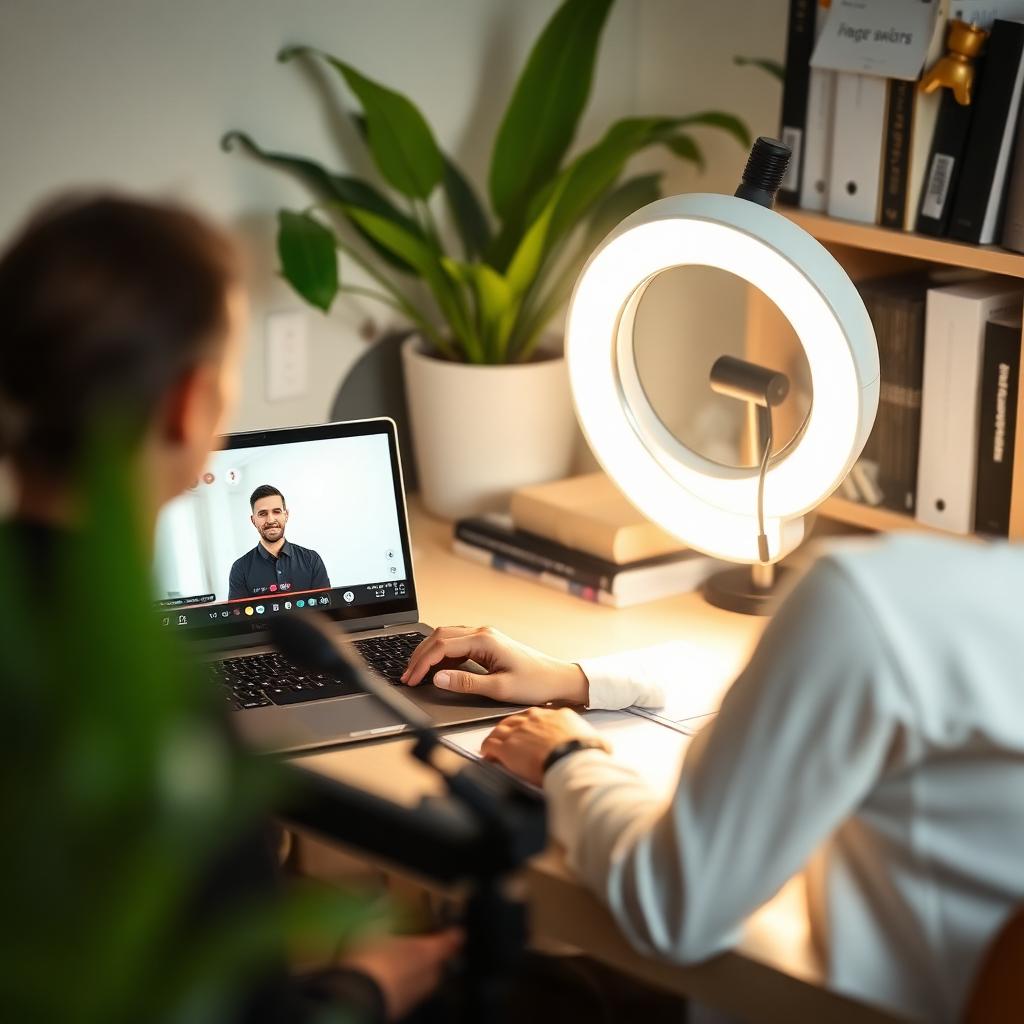
Three technical variables account for roughly ninety percent of the difference between an amateur and a professional video presence: the camera angle, the light source, and the microphone quality. The camera must be at eye level, not below. Laptop cameras placed on a desk look up at the candidate, which is universally unflattering and creates a subtle impression of talking down to the interviewer. Raise your laptop on a stack of books or use a dedicated laptop stand until the top of the camera lens is at or slightly above the level of your eyes. Light comes from in front of you, not behind. The most common video mistake is sitting with a window at your back, which turns you into a silhouette. Face a window whenever possible; if no window is available, position a lamp or a dedicated ring light in front of you at slightly above eye level. Soft, diffused light is more flattering than direct light, so a lamp with a shade or a diffused ring light produces a dramatically better result than an unshaded bulb. Audio is the single most underrated variable. Interviewers will forgive slightly imperfect video, but they will not forgive audio they have to strain to understand. The built-in laptop microphone is almost always the worst part of any candidate's setup, because it picks up keyboard noise, room echo, and every ambient sound. A pair of wired earbuds with an inline microphone is a massive upgrade over a laptop mic and costs almost nothing. A dedicated USB microphone is a permanent professional-grade improvement and one of the best career investments a knowledge worker can make.
The Background, the Frame, and What They Signal
Your background sends a signal whether you want it to or not. The strongest option is a real, tidy background: a bookshelf, a blank wall with a single piece of art, a plant in the corner. Neutral, uncluttered, and unmistakably real. Virtual backgrounds are technically improved but still betray themselves at the edges—hair pixelates, ears vanish, hands disappear when they move—and every one of those moments pulls the interviewer's attention away from your words. The frame matters as much as the background. Position yourself so that the top of your head is near the top of the video frame, with a small amount of empty space above you, and so that your shoulders and upper chest are visible. Too much headroom makes you look small and disengaged; too little makes you look like you are looming at the camera. Sit slightly further back than instinct suggests—about eighteen to twenty-four inches from the camera—so that natural gestures fit within the frame without you having to consciously restrain them. What you wear matters more on video than in person because the camera flattens texture and colour. Solid colours in medium tones read best. Avoid busy patterns, bright whites (which blow out the exposure), and very dark colours (which lose all detail). If you would wear a jacket to the in-person interview, wear the same jacket to the video interview; interviewers unconsciously read the choice as a signal that you are treating the conversation with the same seriousness.
On-Camera Behaviour: Where to Look and How to Move
The single hardest habit to build on video is looking at the camera lens rather than at the interviewer's face on your screen. Human instinct is to look at the eyes of the person you are speaking to, and on video the eyes are at the bottom of the screen, not at the camera. When you look at the screen, the interviewer sees you looking down and away, which reads as evasive or disengaged even though you are actually giving them your full attention. The fix is deliberate: look at the camera lens whenever you are speaking, especially for the first and last sentences of any answer, and use glances at the screen only when the interviewer is speaking. Gestures are your friend on video, but they need to be scaled to the frame. Natural hand movements that would land well in person often disappear off the bottom of the video frame or, worse, appear as sudden objects flying into the shot. Keep gestures roughly within the width of your shoulders and at roughly chest height. Sit slightly forward in your chair to project engagement, but avoid leaning so far in that your face fills the entire frame. Energy needs to be dialled up slightly on video compared to in person. The compression of the medium flattens your natural presence, so what feels like normal energy on your side of the screen often reads as flat on the interviewer's side. Speak with slightly more warmth, smile slightly more often at natural moments, and use more vocal variation than you would face-to-face. This is not performance; it is compensating for the medium.
The Technical Rehearsal You Must Do Before Every Interview
The failure mode of video interviews is almost always a technical detail no one thought to check. Fifteen minutes before every video interview, run the following rehearsal from the exact spot you will sit during the actual call.
- Open the same video platform the interviewer will use and start a test call—Zoom, Teams, Meet, and any dedicated platforms all behave slightly differently.
- Check that your camera, microphone, and speakers are all selecting the correct devices in the app's settings, not the wrong ones from a previous call.
- Close every non-essential browser tab, chat app, and notification source; a Slack notification popping up mid-interview is a small but real friction point.
- Silence your phone completely and place it out of arm's reach so you are not tempted to check it during the call.
- Confirm that anyone sharing your space knows not to interrupt for the duration of the interview, and put a sign on the door if that is a genuine risk.
- Have a printed copy of your resume, the job description, and a short list of the questions you plan to ask; digital copies work but eye-tracking a second screen is visible on camera.
- Load the interviewer's LinkedIn profile in a background tab so you can glance at their name and title if you need a mental prompt.
Handling Technical Problems Without Losing the Room
Technical problems happen to every candidate eventually, and the difference between a graceful recovery and a fatal wobble is entirely in how you handle the moment. If your connection glitches, do not panic and do not apologise excessively. Say clearly, 'It sounds like my audio just dropped for a moment—could you repeat the last thing you said?' Interviewers universally forgive technical issues that are handled with composure; what they judge is the emotional reaction, not the glitch itself. If the platform crashes entirely, have a backup plan ready before the interview starts. Save the interviewer's phone number and email in a place you can access from your phone, and confirm at the start of the call how they would like you to handle a total disconnection. A candidate who says 'If we drop, I will re-join in the same link within a minute' at the start of the call has already demonstrated composure, and if it happens, the recovery is smooth rather than panicked. One of the most powerful ways to show remote-work maturity in a video interview is to briefly acknowledge the medium at the start. A short sentence like 'Just before we get started, can you confirm you can hear me clearly?' does two things: it establishes audio quality on the record and it signals that you take remote communication seriously. Interviewers hiring for remote roles are consciously evaluating whether you have the discipline to work well in this medium day in and day out, and every small signal that you do compounds in your favour.
The Follow-Up: How to Reinforce a Strong Video Performance
The follow-up after a video interview matters even more than after an in-person interview, because the interviewer has no physical memory of you to anchor the impression—only the version of you they saw through a camera. Send a personalised thank-you email within a few hours, not a few days. Reference the specific parts of the conversation that mattered to that interviewer, add one useful piece of context you did not have time for in the call, and close with a specific line about why the conversation reinforced your interest in the role. If the interviewer mentioned any specific project, framework, or article during the call, reference it directly in the follow-up. This is one of the highest-leverage moves in remote hiring because it proves that you were listening carefully, and careful listening is one of the top predictors of remote-work success. Interviewers explicitly look for this signal when hiring for distributed teams. Finally, treat every video interview as a training run for the next one. Note what worked, what did not, and what you would change in your setup for next time. The compounding effect of small technical and behavioural improvements is enormous—candidates who invest in their video presence early in a search are dramatically more effective by the time they reach final rounds. If the interview surfaced angles your written materials do not yet emphasise, tools like the Resumeva Cover Letter Builder and Resume Builder make it easy to tighten the alignment between your on-camera story and the documents the hiring team will circulate afterwards.
Build your ATS-friendly resume
Choose a layout and build a resume using your own experience.
Check your ATS score
Review what Resumeva extracts and the findings its own scoring method produces.
Frequently asked questions
Where should my camera be positioned?+
At eye level, not below. Raise your laptop on a stand or a stack of books until the top of the camera lens is at or slightly above your eyes. Cameras below eye level are universally unflattering and create a subtle impression of talking down to the interviewer.
Do I need a ring light?+
Not necessarily—a window in front of you is often the best light source. If natural light is not available, a lamp with a shade positioned in front of you at slightly above eye level works well. Direct, unshaded bulbs are the worst option.
Should I use a virtual background?+
Prefer a real, tidy background whenever possible. Virtual backgrounds still pixelate at the edges—hair, ears, and moving hands betray them—and every glitch pulls the interviewer's attention away from your words.
What is the biggest technical mistake candidates make?+
Poor audio. The built-in laptop microphone is almost always the weakest part of a candidate's setup. Wired earbuds with an inline microphone are a massive upgrade at almost no cost.
Should I look at the camera or at the interviewer's face?+
At the camera lens when you are speaking, especially for the first and last sentences of any answer. Looking at the interviewer's face on screen reads as looking down and away, even though it feels more natural.
How do I handle a technical glitch mid-interview?+
Stay calm and address it directly: 'It sounds like my audio just dropped—could you repeat the last thing you said?' Interviewers universally forgive technical issues that are handled with composure; what they judge is the emotional reaction, not the glitch itself.
Keep building
Tools and examples that pair with this guide.
General career guidance and examples. Adapt suggestions to your own experience; employer requirements and hiring outcomes vary.