A real Resumeva layout
The preview shows the selected template's structure, spacing, typography, and visual hierarchy.
Preview the layout, then open a blank resume with this exact template selected. Add only your own employers, dates, skills, qualifications, and results.
Starts a blank resume. No sample person or sample achievement is copied.
Read the web designer writing guide ↓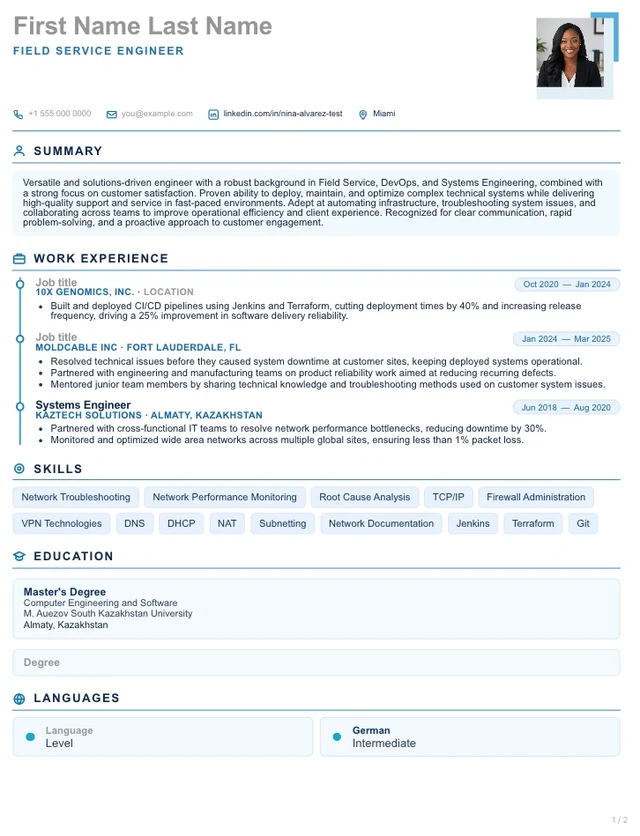
Examples updated . Fictional teaching examples, not customer results or independently certified advice. Our editorial standards
A two-column layout with a sidebar for web designer applications, with an optional photo and movable sections. Each detail below comes from this layout's own structure, so you can tell it apart from the other web designer layouts before you start.
The preview shows the selected template's structure, spacing, typography, and visual hierarchy.
Selecting the template carries only its layout into the builder—not the fictional example content.
You can edit every supported section and inspect the finished document before downloading it.
Resumeva templates use readable text and familiar resume sections. Different employer systems can still extract the same document differently, so no template is described as universally ATS-approved. Use the extraction preview to review what Resumeva can read from your finished resume.
Read the scoring and extraction limitsThe writing guide
Show usable website designs, responsive layouts and implementation handoff. Use the examples as a starting point, then make every claim your own.
Choose an experience level to see a completed web designer resume. Use its structure and wording as inspiration, then adapt it to your own experience.
Show work you owned independently, the decisions you made and outcomes you can explain.
Web Designer
Web Designer with experience in responsive websites for service businesses. Combines responsive design and wireframing with clear documentation and dependable follow-through.
Jan 2023 – Aug 2026
Asterbridge Studio · Portland, Oregon
Jun 2019 – Dec 2022
Juniper Vale Design · Portland, Oregon
Associate Degree in Web Design
Asterbridge Technical College
May 2019
Fictional example: names, employers, dates, qualifications and results are illustrative. Use only your own facts and remove entries that do not apply. This layout illustrates the writing structure; your exported design follows the template selected above.
Copying an example does not change your saved resume.
Match web designer vacancies by location, seniority, hours and responsibilities. Separate base pay from bonuses or commission. A national median is not a personal salary offer.
Use the closest occupational description and read its geography and projection dates. Long-term employment growth is different from current vacancies or annual openings.
For US research, the Bureau of Labor Statistics provides pay and outlook by occupation. Select the closest match to your actual duties; its categories may be broader than this template’s title. For other countries, use the equivalent official local source.
Explore official pay and outlook dataSource: US Bureau of Labor Statistics, Occupational Outlook Handbook. No salary estimate or growth forecast is inferred from this template.
Use an observable result when you cannot verify a number. Do not disclose confidential details.
Use recognizable section headings, consistent dates and selectable text. Follow the vacancy’s upload instructions. Check that headings, contact details and bullets remain in a sensible order after export; complex layouts can be interpreted differently by different parsers.
A Resumeva score is not an employer’s ATS score, a job-match guarantee or a prediction of an interview.
Read Resumeva’s scoring and extraction limitsThese are role-relevant terms to compare with your vacancy—not a measured ranking of the most common keywords. Include a term only when it describes something you can demonstrate.
Use the employer’s wording where accurate, expand unfamiliar abbreviations once, and explain tools in the context of your work. Repeating terms or hiding keywords does not establish experience.
This template can organize your web designer experience, but you are not limited to a layout named after your job. Choose the design that makes your strongest evidence easy to find.
These completed summaries belong to fictional candidates. Choose the scope that reflects your experience and rewrite the details in your own words.
Web Designer with experience in responsive websites for service businesses. Brings a foundation in responsive design and wireframing from earlier work as a junior web designer.
Web Designer with experience in responsive websites for service businesses. Combines responsive design and wireframing with clear documentation and dependable follow-through.
Too vague
“Responsible for web designer duties.”
Specific examples · fictional
Why these work: they describe an action, its context and an outcome. The details are fictional; use a number only when you can verify it from your own work.
Before adding a skill, connect it to something you actually did:
Support communication, collaboration or leadership with a specific action rather than a list of unsupported adjectives.
List your actual qualification or design training and link to a portfolio with permission to share the work. Explain your contribution to collaborative projects.
Fictional education example
Associate Degree in Web Design
Asterbridge Technical College · May 2019
A template is not a credential checklist. Check the vacancy and relevant local requirements; leave out qualifications you do not hold.